
Path of Idle Baptism Guide: Preferred Skills & Talent Locks
A patch 1.1.1 Baptism and Inspire workflow for Talent columns, corrected skill tips, Preferred Skills, Talent locks, and controlled testing.
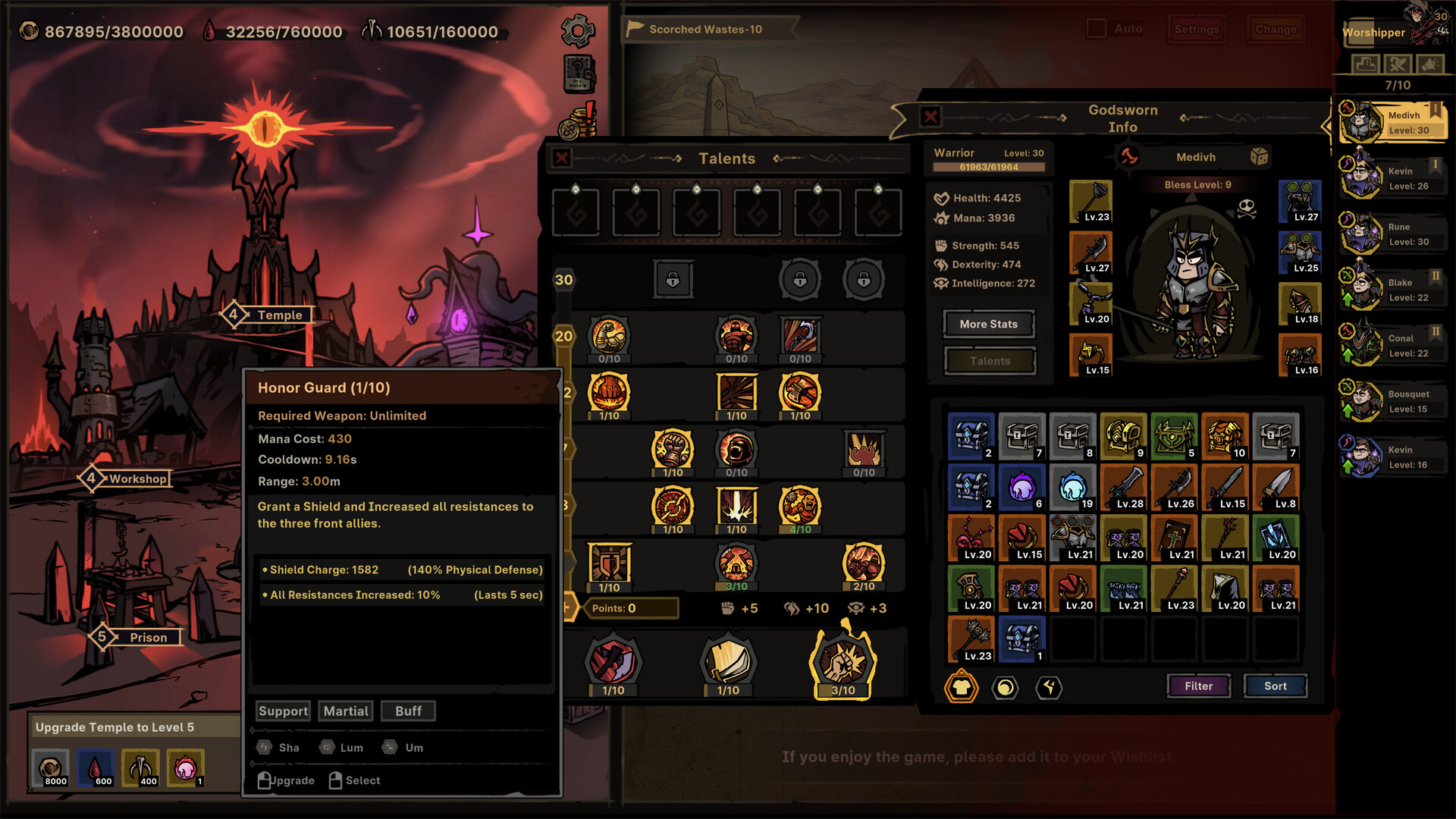
Capture the working Talent and skill setup before changing it. Requirements, range, cooldown, and effect text are part of the baseline.
Credit: Official Path of Idle Steam store screenshot ↗
Version note: The official store screenshot illustrates the interface only. Use the installed 1.1.1 client for current columns, costs, controls, and values.
Quick Answer
- ✓Choose the Godsworn's role, set matching Preferred Skills, and lock Talents you cannot afford to lose.
- ✓In Patch 1.0.13, one Inspire grants all Masteries; old Baptism upgrades in Temple Upgrades become Lock Inspire Mastery upgrades.
- ✓Patch 1.1.1 standardizes the five Talent columns and fixes incorrect Baptism skill tips, but does not document every changed tooltip.
Golem Mastery Locks Are Separate from Baptism
Patch 1.1.3 adds Mastery locking to Golem Reshape. Its former maximum-level increase now raises both the lower and upper bounds of the reshaped Mastery level. This does not replace Baptism Preferred Skills, Talent locks or Inspire Mastery locks. The official note does not publish lock costs, the number of locks, exact level bounds or a best lock order, so verify the current Golem panel before committing resources.
Continue with: read the complete 1.1.3 change log
Patch 1.1.1 Talent Columns and Baptism Skill Tips
Version 1.1.1 standardizes the Talent display: column one contains Talent Skills, columns two and three contain Talent Masteries, column four contains Inspire Masteries, and column five contains Mutated Skills. The same official note says incorrect Baptism skill tips were fixed. Use those column roles to identify which system produced a result, and trust the installed 1.1.1 tooltip over an older screenshot. The note does not list every corrected line, value, or affected skill, so it does not support reconstructing old-versus-new effects from the announcement alone.
Continue with: review every change in Patch 1.1.1
Inspire Grants All Masteries in Patch 1.0.13
Version 1.0.13 changes Inspire to work like Baptism: one Inspire now grants all Masteries. Deprecated Baptism upgrades in Temple Upgrades are converted into Lock Inspire Mastery upgrades. That is the full public rule; the official note does not document every menu step, cost, selection chance, or optimal lock order. Update before planning another Inspire, read the current Temple text, lock only Masteries essential to the character's defined role, and compare the result on the same stage.
Continue with: check the current Temple and town workflow
Source: Official version 1.0.13 notes ↗
What Baptism Changes—and What This Guide Does Not Guess
Baptism is a Temple progression system used to shape a Godsworn's build. Its value comes from improving the skills and Talents that support a defined job, not from chasing a vague higher-quality result. Version 1.0.3 made two important controls official: Preferred Skills apply to Baptism, and Talents can be locked or unlocked by clicking them. Those controls let you protect the working parts of a build before changing the uncertain parts. This guide does not publish hidden odds, guaranteed combinations, or a universal best roll because the developer has not documented those values publicly. Read the exact costs and result text in the installed build before confirming.
Source: Official version 1.0.3 update ↗
Step 1: Write the Character's Job in One Sentence
Before touching a roll, describe the job: survive at the front, deal elemental area damage, provide healing and buffs, or supply ranged physical damage. Then list the two or three effects that make that job work. A frontline wants survival and reliable engagement; a damage dealer wants compatible damage skills and equipment; a support wants the healing, shielding, summon, or buff package that stabilizes the line. This sentence is the acceptance test for every Baptism result. Without it, a visually impressive change can remove the skill that made the entire team function.
Continue with: choose a role with the classes overview
Step 2: Set Preferred Skills Before Baptism
Open the Codex and mark skills that fit the job as Preferred Skills before running Baptism. The official 1.0.3 note says this preference now applies to Baptism. Treat preference as guidance rather than a promised result: the public note does not state exact probabilities. Prefer a small, coherent set instead of marking every attractive skill. For a tank, prioritize the defensive or sustain package the line needs. For a damage dealer, prioritize skills compatible with the equipped weapon and damage plan. For a support, preserve the effect that fixes the team's actual failure point.
Source: Official version 1.0.3 update ↗
Step 3: Lock the Talents That Already Work
Click Talents to lock the pieces that are essential to the role, using the current Temple interface. Do not lock a Talent merely because it has a high number; lock it because removing it would break survival, damage delivery, weapon compatibility, or support coverage. Leave replaceable or off-role Talents available to change. Before confirming, review every lock and read the displayed price. If the interface or available locks differ from an old screenshot, trust the installed version and current official notes because launch-week patches changed Temple behavior.
Source: Official version 1.0.3 update ↗
Step 4: Record a Baseline Before You Roll
Use one repeatable stage and record whether the team clears, who falls first, whether Fatigue becomes the limiting factor, and roughly how long the attempt lasts. Also note the current skills and locked Talents. This protects you from accepting a result solely because its presentation looks stronger. After Baptism, replay the same encounter without simultaneously changing equipment, team order, or automation. A useful result should improve the job you defined while keeping the rest of the line stable. Several consistent attempts are stronger evidence than one lucky clear.
Continue with: use the controlled team-testing method
Reset Talents After the 1.0.5 Blessing Change
Version 1.0.5 changed Blessing to grant one Talent Point every five levels, up to six, without random rolls. The developer told players to reset Talents after updating so the new points apply. If a character created on an earlier full-release build appears to have missing points or a weaker Talent layout, complete that reset before spending more resources trying to repair the build through Baptism. First remove version drift; then evaluate the actual result. This step is especially important when following a build or video recorded before the August 17 update.
Continue with: review the launch patch tracker
Source: Official Path of Idle announcement feed — version 1.0.5 ↗
Patch 1.0.11 Fixes Missing Talent Points From Baptism and Inspire
The official 1.0.11 notes fix separate issues where Baptism or Inspire could cause missing Talent points. If the loss occurred on an older build, update first, restart once, reopen the character, and compare the point total before making another Baptism or Inspire change. This is different from the one-time 1.0.5 instruction to reset Talents so revised Blessing points apply. The 1.0.11 note does not describe the root cause or guarantee how an already-affected save is repaired, so preserve screenshots and report the exact version if points are still missing after updating.
Continue with: follow the safe troubleshooting sequence
Source: Official version 1.0.11 notes ↗
Baptism, Mutated Skills, and Crystallized Skull Are Different Decisions
Keep the systems separate when diagnosing a build. Baptism uses Preferred Skills and Talent locks to shape the Temple result. Later full-release updates extended Preferred Skills to Mutated Skills, while Crystallized Skull was changed to alter Mutated Skills. If the Talent interface changes after a Skull, that is not necessarily a Baptism failure; patch 1.0.8 added real-time Talent UI updates when Mutated Skills change. Identify which system produced the change before spending another resource. Mixing all three into one uncontrolled rebuild makes it impossible to know what helped.
Continue with: Crystallized Skull and Mutated Skills guide
Source: Official Path of Idle announcement feed — versions 1.0.4 to 1.0.8 ↗
A Safe Baptism Checklist
Confirm the installed patch, define the role, set only relevant Preferred Skills, lock essential Talents, read the current cost, and capture the pre-roll setup. After the result, inspect skill range and weapon requirements before entering combat. Test the same stage several times and compare first death, consistency, and clear time. Keep the result if it strengthens the defined role without creating a new weakness; otherwise stop and reassess instead of chaining emotional rerolls. This procedure cannot guarantee a particular outcome, but it limits avoidable waste and makes each decision explainable.
Patch 1.0.9 Adds a Separate Codex Mastery Preference
Version 1.0.9 added Preferred settings for Codex class Masteries, increasing the chance of target Masteries appearing for Golems and Inspire. Do not merge that statement with Baptism Preferred Skills: they are documented in different updates and affect different workflows. Set the preference in the system you are actually changing, then test that result in isolation. This guide does not publish an exact probability because the official note says the chance is greatly increased but does not give a number.
Source: Official version 1.0.9 update ↗
Related Guides
Evidence Sources
- Official version 1.1.3 Golem Reshape changes ↗
- Official version 1.1.1 Talent display and Baptism tooltip fixes ↗
- Official version 1.0.13 Inspire and Temple changes ↗
- Official version 1.0.3 update ↗
- Official Path of Idle announcement feed ↗
- Official Steam store ↗
- SteamDB version history ↗
- Official version 1.0.9 update ↗
- Official version 1.0.11 Talent-point fixes ↗
Revision note: checked against the sources above on 2026-09-29. Recheck in-game tooltips after every balance update.